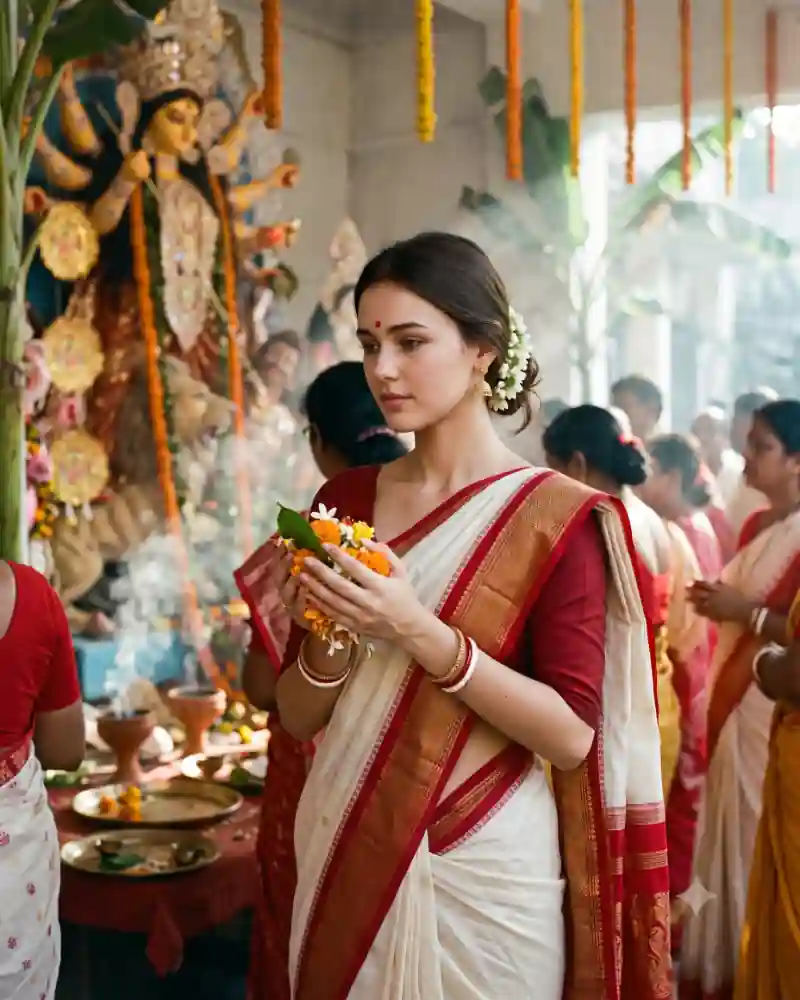
Some festival photographs are memorable because they are quiet. In this Durga Puja portrait, a young woman holds flowers for Pushpanjali and looks down toward the offering. The red border of her white saree stands out against the softly lit pandal. There is a Durga idol behind her, along with marigold strands and other visitors. Nothing in the composition needs to compete with the flowers in her hands or the calm expression on her face. If you want to create this traditional Bengali look from your own photo, the main AI prompt includes the saree, jasmine hairstyle, flower offering and pandal atmosphere.
Inside This White Saree Pushpanjali Photo
The off-white saree with a red border is the clearest visual detail. Its pleats fall naturally over a red blouse, and the border runs across the shoulder without turning into a separate piece of clothing. The hair is gathered into a low bun with jasmine flowers. Small gold earrings, traditional bangles and a red bindi add familiar festive details without overwhelming the face. In both hands she holds a little arrangement of flowers and leaves. The Durga idol appears toward one side of the frame, softened by depth of field and a light veil of incense haze.
Why This Particular Festival Look Works
Unlike an aarti portrait, this scene is about offering flowers rather than holding a lamp or flame. Keeping that distinction clear makes the image and its title more accurate. The red-and-white clothing is expressive on its own. With soft daylight and a simple background, there is no need to add exaggerated lens flares or dramatic stage lighting.
How to Create This AI Photo With Your Own Picture
Step 1: Choose a clear reference photograph
Use a well-lit picture with a clearly visible face. Avoid strong beauty filters that hide natural features. If someone else appears in the reference, make sure you have permission to use their photo. Use a gentle downward gaze and an offering held at a comfortable height.
Step 2: Open a compatible AI image editor
Try an editor that supports image generation or editing with uploaded photos, such as compatible versions of ChatGPT or Gemini. Tool features, availability and the way they interpret instructions can vary.
Step 3: Paste the main prompt from this page
Copy the full AI prompt from its separate prompt field. Keep the outfit, pose and setting instructions if you want to match the example, or edit only the details you want to change.
Step 4: Generate and inspect the first result
Check facial likeness, natural skin tones, hands, proportions, fabric edges, and the objects in the scene. A successful background cannot make up for an obviously incorrect hand or face. Keep the flowers in the hands; do not add a flame or an aarti thali to this composition.
Step 5: Correct only what needs correcting
Instead of completely rewriting a prompt, request one focused adjustment at a time. Ask the tool to preserve the details that already work while fixing an awkward pose, clothing fold or background element.
Step 6: Export for where you will use it
Save the best quality available. A vertical 4:5 crop suits many photo posts, while 9:16 can work for Stories. Leave space around important details before choosing a tighter crop.
Pro Tips for a More Realistic Result
Keep the flower offering small
Pushpanjali flowers should fit comfortably in the palms. A few marigolds, white blossoms and green leaves are more believable than an oversized bouquet.
Separate saree and blouse
The white fabric and red border should drape over the red blouse naturally. Check that the border continues consistently across the shoulder.
Give the hands a clear shape
Hands gently supporting flowers are easier to read than fingers tightly tangled around petals. Request distinct fingers and a natural wrist angle.
Place the idol behind the subject
Keep the Durga idol softly visible in the pandal. It should suggest the sacred setting rather than appear as an object being held or balanced on the shoulder.
Keep jasmine and jewelry believable
The flowers should sit around the bun, not across the face. Gold earrings and bangles need realistic sizes and matching pairs.
Use a calm expression
Eyes looking toward the offering and relaxed shoulders suit this picture better than a wide fashion pose or direct dramatic stare.
Explore More AI Photo Editing Ideas
Looking for other festival scenes, portraits and editing styles? Browse the curated AI prompt library to see more sample images and find a prompt that matches the photograph you want to create. If you are learning how to write better instructions or correct image details, the AI photo editing guides and tutorials cover practical ideas beyond this single picture. Want to edit a photograph with two people rather than a solo portrait? Explore the couple photo prompt collection for shared poses, traditional clothing and different backgrounds.
Frequently Asked Questions
What does Pushpanjali mean in this photo idea?
It refers to offering flowers during worship. This prompt focuses on the moment of holding flowers respectfully inside a Durga Puja pandal.
Is this the same as an aarti photo prompt?
No. The image shows flowers and leaves in the hands, not a lit aarti plate. Keeping those props distinct helps the result match the reference.
Can I change the white-and-red saree?
Yes, but that traditional color pairing is central to this particular Bengali festive portrait.
Does the Durga idol need to be sharply visible?
No. It can remain softly focused in the background while the person and flower offering stay sharp.
Can I use this AI photo prompt in Gemini or ChatGPT?
You can try it in a compatible version of Gemini or ChatGPT that supports image generation or editing with reference photographs. Upload your image, paste the main prompt, then review the result. Available features and output quality may differ.
How do I keep my face recognizable in the new image?
Use a clear reference photograph and ask the editor to preserve recognizable facial features, natural complexion and hairstyle. Review the generated picture against your original and request corrections when necessary. Exact facial preservation is not guaranteed.
Final Thoughts
The white saree, red border and small flower offering give this portrait a simple visual story. Every detail supports the quiet atmosphere of the pandal. Use natural lighting, keep the hands and saree folds accurate, and allow the background to stay softly present rather than overwhelming the subject.