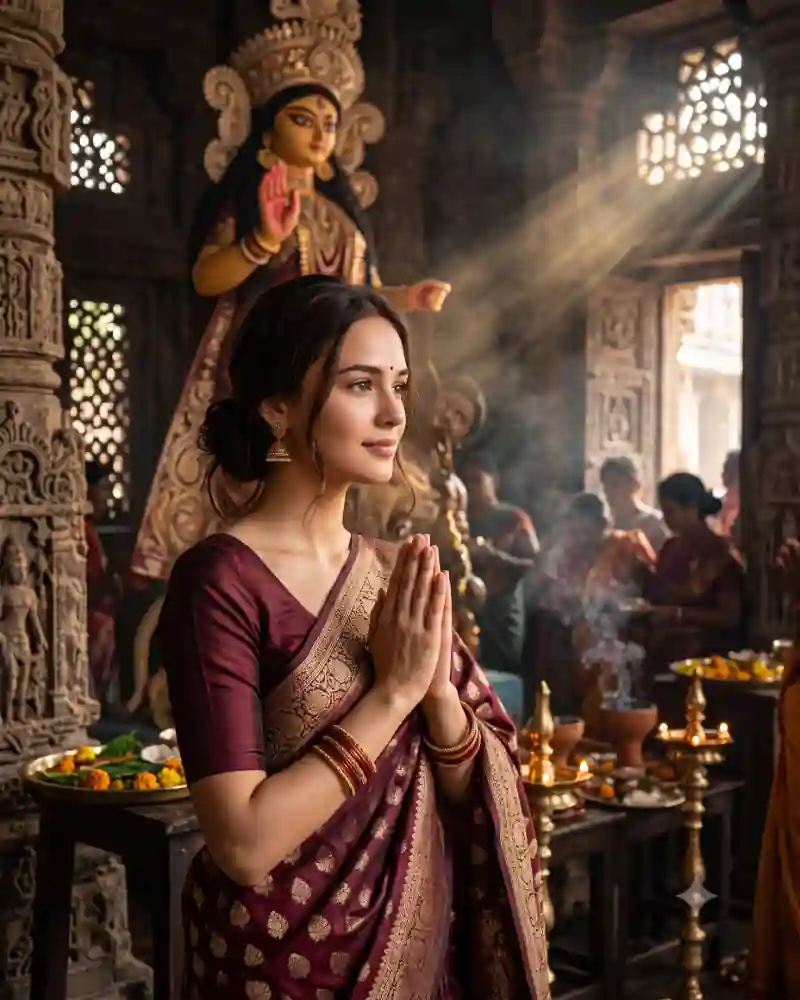
Light changes this Durga Puja portrait more than anything else. Sunbeams enter a carved stone prayer hall, catching a little incense haze and falling across a maroon silk saree. In the foreground, a woman stands with her palms together in prayer. The pose is gentle and still. You can see the gold border of the saree, the jewelry and the Durga idol in the background, but none of those details distract from the expression. The main AI prompt on this page is designed for that particular combination of a maroon saree, hands-joined prayer and realistic temple lighting.
Inside This Maroon Saree Durga Puja Prayer Photo
The saree is a deep wine-maroon shade with antique-gold woven motifs. A broad gold border follows the drape across the shoulder and contrasts with the softly illuminated stone interior. Traditional earrings, bangles and a small red bindi are present, but the joined palms are the main gesture. The fingers should meet naturally at chest level rather than appearing stiff or crossed. Carved pillars frame the hall. Brass lamps and low offering trays sit behind the subject, while the Durga idol remains recognizable in the background. Sunbeams and soft incense haze give the interior depth.
Why This Particular Festival Look Works
This composition is built around stillness rather than dance, movement or an elaborate prop. A believable prayer gesture is enough to establish the mood. It is also different from a flower-offering portrait. Here, the hands are empty and joined together. That makes the shape of the palms and the direction of the light especially important.
How to Create This AI Photo With Your Own Picture
Step 1: Choose a clear reference photograph
Use a well-lit picture with a clearly visible face. Avoid strong beauty filters that hide natural features. If someone else appears in the reference, make sure you have permission to use their photo. A simple namaste at chest level is the central pose here.
Step 2: Open a compatible AI image editor
Try an editor that supports image generation or editing with uploaded photos, such as compatible versions of ChatGPT or Gemini. Tool features, availability and the way they interpret instructions can vary.
Step 3: Paste the main prompt from this page
Copy the full AI prompt from its separate prompt field. Keep the outfit, pose and setting instructions if you want to match the example, or edit only the details you want to change.
Step 4: Generate and inspect the first result
Check facial likeness, natural skin tones, hands, proportions, fabric edges, and the objects in the scene. A successful background cannot make up for an obviously incorrect hand or face. Ask for consistent sunbeams from a real window opening rather than placing spotlights at random.
Step 5: Correct only what needs correcting
Instead of completely rewriting a prompt, request one focused adjustment at a time. Ask the tool to preserve the details that already work while fixing an awkward pose, clothing fold or background element.
Step 6: Export for where you will use it
Save the best quality available. A vertical 4:5 crop suits many photo posts, while 9:16 can work for Stories. Leave space around important details before choosing a tighter crop.
Pro Tips for a More Realistic Result
Keep palms joined naturally
Both palms should meet with five fingers on each hand. Ask for a relaxed namaste gesture at the center of the chest and natural wrist alignment.
Make sunbeams follow the windows
The brightest rays should come from a believable opening, not from random directions. Keep the face illuminated without washing out its details.
Preserve the silk weave
Gold motifs should follow the folds of the maroon saree. If the pattern appears printed onto skin or jewelry, ask for clearer fabric separation.
Keep the idol at a natural distance
The Durga idol belongs within the hall behind the person. Use depth of field so it remains part of the place rather than competing for the foreground.
Use subtle incense haze
A little haze catches the window light. Too much makes the photograph look foggy and hides the carved stone.
Avoid over-styling the expression
A calm gaze, relaxed jaw and ordinary posture suit the devotional moment. Do not force an exaggerated smile or dramatic head tilt.
Explore More AI Photo Editing Ideas
Looking for other festival scenes, portraits and editing styles? Browse the curated AI prompt library to see more sample images and find a prompt that matches the photograph you want to create. If you are learning how to write better instructions or correct image details, the AI photo editing guides and tutorials cover practical ideas beyond this single picture. Want to edit a photograph with two people rather than a solo portrait? Explore the couple photo prompt collection for shared poses, traditional clothing and different backgrounds.
Frequently Asked Questions
Is this a namaste pose or a flower offering?
It is a hands-joined prayer portrait. The subject is not holding flowers, a plate or dandiya sticks.
Can I make the same scene with a different saree?
Yes. Burgundy, deep green or cream with a gold border can work if you keep the subdued temple lighting.
How do I stop the joined hands looking distorted?
Request a straightforward palms-together gesture at chest height and ask the editor to correct the hands separately if needed.
Does this work for a Durga Puja profile picture?
Yes. A closer crop can work as long as the face, joined palms and a hint of the temple background remain visible.
Can I use this AI photo prompt in Gemini or ChatGPT?
You can try it in a compatible version of Gemini or ChatGPT that supports image generation or editing with reference photographs. Upload your image, paste the main prompt, then review the result. Available features and output quality may differ.
How do I keep my face recognizable in the new image?
Use a clear reference photograph and ask the editor to preserve recognizable facial features, natural complexion and hairstyle. Review the generated picture against your original and request corrections when necessary. Exact facial preservation is not guaranteed.
Final Thoughts
A good prayer portrait should feel respectful and unhurried. The maroon silk and warm temple light add beauty, but the simple gesture carries the scene. Keep the hands, lighting and saree folds believable, and let the temple background provide a quiet sense of place.