PromptCineAI photo & video prompts
Back to gallery
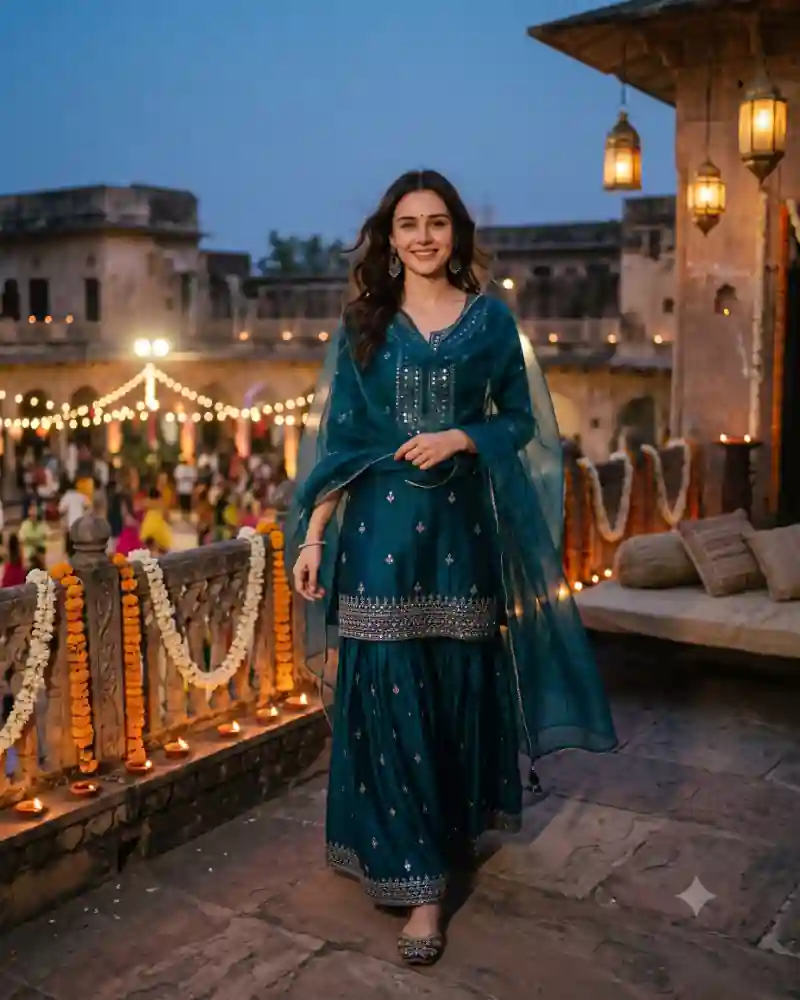
Girl in a teal embroidered sharara suit standing on a heritage balcony decorated with diyas and marigold garlands
Full prompt

Teal Sharara Navratri Balcony AI Photo Prompt for Girls

Shared by Promptcine

10 views ยท 6 copies
Nano Banana 2GeminiGirls#Festival
Copy-ready prompt2208 characters

Produce a spectacular, highly realistic luxury Navratri fashion portrait using the uploaded female photograph as the exact facial identity reference. FACE LOCK โ€” IMPORTANT: Preserve the woman's original face precisely, including bone structure, eyes, nose, lips, natural complexion, hairline and age. The result must clearly show the same real person, without artificial facial enhancement or identity drift. Dress her in an exceptionally elegant contemporary Indo-fusion festive ensemble: a midnight-teal silk sharara set featuring delicate handcrafted antique-silver mirror embroidery, a beautifully tailored modest embroidered kurti, wide flowing sharara trousers and a lightweight sheer teal organza dupatta with tiny hand-finished borders. Accessorize with refined oxidized-silver statement earrings, a delicate bracelet and traditional embroidered juttis. Style her hair in soft natural waves, with realistic individual strands catching the evening light. The scene takes place on the beautifully decorated terrace of a historic Indian haveli during an intimate Navratri celebration. Real marigold garlands, terracotta oil lamps, handwoven cushions and warm hanging lanterns create an inviting, authentic festive setting. Capture the subject walking slowly across the terrace while lightly adjusting her dupatta, glancing naturally toward the photographer. Her expression is relaxed and spontaneous. A softly illuminated Garba gathering appears in the distant courtyard. The sky retains a beautiful natural blue-hour tone. Warm practical lantern light falls realistically across the subject, giving the photograph a refined editorial atmosphere without fake studio spotlighting. Photographed on a professional full-frame 85mm lens, f/2, natural low-light exposure, delicate photographic grain, realistic cloth movement, detailed embroidery, authentic skin texture and balanced cinematic color grading. No CGI appearance, unnatural moon glow, artificial facial symmetry, exaggerated jewelry, plastic skin, unrealistic architecture, duplicated limbs or excessive post-processing. Vertical portrait aspect ratio 4:5, premium cinematic fashion photography, high-resolution detail, no captions or watermark.
Share prompt
There is something lovely about a festival venue just after sunset. The sky is still blue, the lamps have been lit, and the courtyard below is beginning to glow. This Navratri portrait uses that time of day. A woman in a deep teal sharara stands along a heritage balcony, with marigold garlands on the carved railing and a row of small diyas at her side. Unlike a Garba dance pose, the image is calm and outfit-focused. The main AI prompt helps recreate the teal fabric, natural standing posture and warm evening setting with your reference picture.

Inside This Teal Sharara Navratri Balcony Photo

The teal embroidered kurta has delicate silver detailing around the neckline and hem. Wide sharara trousers sit beneath it, giving the outfit a graceful shape without the heavy flare of a lehenga. A sheer matching dupatta flows along one side, and the simple earrings and footwear keep the styling light. The subject stands comfortably with one hand adjusting the fabric instead of performing a dance move. The carved balcony railing is decorated with marigold garlands and small diyas. Warm lanterns hang from the building, while a softly lit courtyard and gathering guests appear in the distance.

Why This Particular Festival Look Works

The scene gets its color from a restrained palette: deep teal fabric, blue evening sky and gold lamplight. That contrast makes the outfit noticeable without needing neon lighting. It is also a useful alternative to lehenga-centered Garba pictures. The sharara has a different silhouette, and the balcony provides enough festival context even without dance sticks or a crowd close to the camera.

How to Create This AI Photo With Your Own Picture

Step 1: Choose a clear reference photograph

Use a well-lit picture with a clearly visible face. Avoid strong beauty filters that hide natural features. If someone else appears in the reference, make sure you have permission to use their photo. Specify that the outfit has separate wide sharara trousers, not a floor-length lehenga.

Step 2: Open a compatible AI image editor

Try an editor that supports image generation or editing with uploaded photos, such as compatible versions of ChatGPT or Gemini. Tool features, availability and the way they interpret instructions can vary.

Step 3: Paste the main prompt from this page

Copy the full AI prompt from its separate prompt field. Keep the outfit, pose and setting instructions if you want to match the example, or edit only the details you want to change.

Step 4: Generate and inspect the first result

Check facial likeness, natural skin tones, hands, proportions, fabric edges, and the objects in the scene. A successful background cannot make up for an obviously incorrect hand or face. Make sure the row of small diyas sits on a solid railing with realistic spacing.

Step 5: Correct only what needs correcting

Instead of completely rewriting a prompt, request one focused adjustment at a time. Ask the tool to preserve the details that already work while fixing an awkward pose, clothing fold or background element.

Step 6: Export for where you will use it

Save the best quality available. A vertical 4:5 crop suits many photo posts, while 9:16 can work for Stories. Leave space around important details before choosing a tighter crop.

Pro Tips for a More Realistic Result

Keep the sharara shape distinct

The trousers should be wide and flow from the legs, not merge into a single long skirt. Ask for a visible kurta hem over separately shaped sharara pants.

Use small believable diyas

A row of modest clay lamps should sit securely on the railing edge. Avoid floating flames or enormous lamps that overpower the portrait.

Preserve the translucent dupatta

The sheer teal fabric should have visible edges, weight and folds. It can catch a little breeze, but should not dissolve into a cloud.

Keep the balcony safe and proportionate

The carved railing should remain continuous and correctly aligned, with the subject standing comfortably on the walkway rather than on the edge.

Balance evening blues with warm gold

The sky can stay cool while lamps create warm highlights on the fabric. Keep the face naturally lit and the teal from shifting toward black.

Leave architectural breathing room

A full-length 4:5 crop should include the railing, lamps and some courtyard depth. Cropping too closely removes the setting that makes this portrait different.

Explore More AI Photo Editing Ideas

Looking for other festival scenes, portraits and editing styles? Browse the curated AI prompt library to see more sample images and find a prompt that matches the photograph you want to create. If you are learning how to write better instructions or correct image details, the AI photo editing guides and tutorials cover practical ideas beyond this single picture. Want to edit a photograph with two people rather than a solo portrait? Explore the couple photo prompt collection for shared poses, traditional clothing and different backgrounds.

Frequently Asked Questions

Is this a lehenga photo editing prompt?

No. The outfit is a teal sharara set with wide trousers, kurta and a sheer dupatta. That silhouette is part of the appeal.

Can I create it without a balcony reference photo?

Yes, if your chosen editor can generate a new setting. Be sure to review railing geometry and lamp placement.

Can I change teal to another festive color?

Yes. Deep plum, sapphire or emerald can also work with golden lantern light, though teal is the defining color in this reference.

Do I need to add dandiya sticks?

No. The photo is an evening balcony portrait with a festive courtyard below, not an active Dandiya pose.

Can I use this AI photo prompt in Gemini or ChatGPT?

You can try it in a compatible version of Gemini or ChatGPT that supports image generation or editing with reference photographs. Upload your image, paste the main prompt, then review the result. Available features and output quality may differ.

How do I keep my face recognizable in the new image?

Use a clear reference photograph and ask the editor to preserve recognizable facial features, natural complexion and hairstyle. Review the generated picture against your original and request corrections when necessary. Exact facial preservation is not guaranteed.

Final Thoughts

This balcony portrait proves that a festive photograph can be simple. A well-draped sharara, a calm expression and a few glowing diyas create the atmosphere. Use clear reference pictures and make small edits to fabric, lighting and balcony details until the result looks like a believable evening photograph.

Keep exploring

More from #Festival