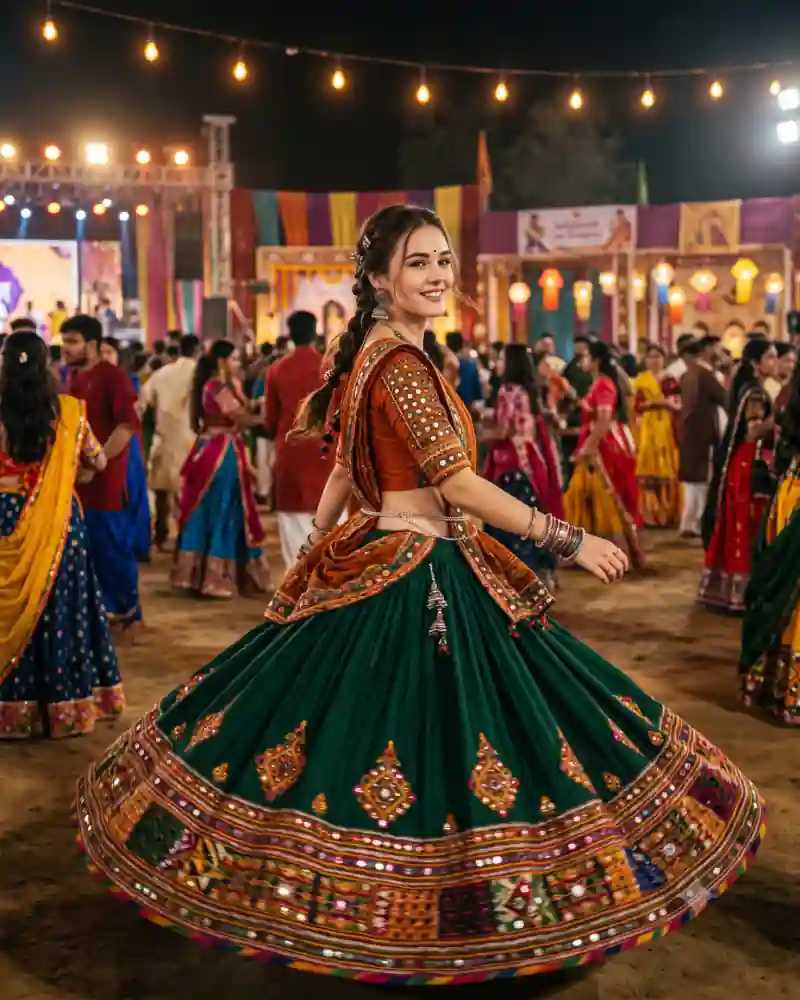
The skirt is the first thing you notice in this Garba photo. A deep emerald-green lehenga opens into a wide circle as the dancer turns, revealing an embroidered border filled with warm colors. She looks back toward the camera with an easy smile, and her orange blouse stands out against the green fabric. Behind her, the Garba ground is full of guests and glowing lights. This style is all about the movement of the clothing. Use the main AI prompt if you want to try an emerald lehenga Garba twirl with your own reference picture rather than a static standing portrait.
Inside This Emerald Lehenga Garba Twirl Photo
The skirt uses rich green fabric with mirror-work accents and a colorful embroidered hem. As the dancer turns, the hem stretches into a dramatic round shape while the upper garment stays close to the body. A burnt-orange embellished blouse adds contrast and makes the upper half of the picture easy to distinguish from the wide skirt. Silver-toned jewelry and bangles finish the look without covering the expression. The crowd remains behind the dancer. There are festival stalls or decorations and warm bulbs in the distance, but the swirling fabric creates its own frame around her.
Why This Particular Festival Look Works
A successful twirl photo shows motion and detail at the same time. If everything is blurred, the embroidery disappears; if the fabric is perfectly rigid, it does not look like a real spin. The contrast of deep green, orange and multicolor trim also gives the image an unmistakable Navratri feel, without relying on oversized graphics or artificial light streaks.
How to Create This AI Photo With Your Own Picture
Step 1: Choose a clear reference photograph
Use a well-lit picture with a clearly visible face. Avoid strong beauty filters that hide natural features. If someone else appears in the reference, make sure you have permission to use their photo. A clear front or three-quarter face photo helps the editor retain facial details during the turn.
Step 2: Open a compatible AI image editor
Try an editor that supports image generation or editing with uploaded photos, such as compatible versions of ChatGPT or Gemini. Tool features, availability and the way they interpret instructions can vary.
Step 3: Paste the main prompt from this page
Copy the full AI prompt from its separate prompt field. Keep the outfit, pose and setting instructions if you want to match the example, or edit only the details you want to change.
Step 4: Generate and inspect the first result
Check facial likeness, natural skin tones, hands, proportions, fabric edges, and the objects in the scene. A successful background cannot make up for an obviously incorrect hand or face. Ask for a single continuous lehenga with realistic spinning motion instead of adding floating fabric panels.
Step 5: Correct only what needs correcting
Instead of completely rewriting a prompt, request one focused adjustment at a time. Ask the tool to preserve the details that already work while fixing an awkward pose, clothing fold or background element.
Step 6: Export for where you will use it
Save the best quality available. A vertical 4:5 crop suits many photo posts, while 9:16 can work for Stories. Leave space around important details before choosing a tighter crop.
Pro Tips for a More Realistic Result
Make the skirt move as one piece
The circular flare should come from the waist and continue into a single continuous hem. Watch for disconnected fabric panels or extra skirts.
Keep the face visible during the turn
A slight look back toward the camera works better than an extreme neck twist. Ask for a natural smile and a comfortable shoulder angle.
Protect the embroidered border
The multicolor trim should travel around the hem at a consistent width. Mirror pieces and threadwork should follow the fabric folds.
Avoid impossible arm positions
Arms may extend gently during a twirl, but they should not appear twisted or duplicated behind the body.
Keep the crowd soft
The Garba crowd makes the setting clear. Use shallow depth of field so individual background dancers do not distract from the main movement.
Leave space for the full skirt
A vertical 4:5 frame can still show the circular flare if the subject is centered and the hem is not cropped. Request a little extra room around the bottom edges.
Explore More AI Photo Editing Ideas
Looking for other festival scenes, portraits and editing styles? Browse the curated AI prompt library to see more sample images and find a prompt that matches the photograph you want to create. If you are learning how to write better instructions or correct image details, the AI photo editing guides and tutorials cover practical ideas beyond this single picture. Want to edit a photograph with two people rather than a solo portrait? Explore the couple photo prompt collection for shared poses, traditional clothing and different backgrounds.
Frequently Asked Questions
Do I need a photo of myself spinning?
No. A regular reference portrait may work with an editor that can generate a new pose. A full-body image can sometimes help with clothing and body proportions.
Can I make the lehenga a different color?
Yes. Royal blue, magenta or maroon can look festive. For this reference look, keep the orange blouse and bright embroidered border as the main contrasts.
Why does the skirt sometimes look like a flat disc?
AI generation can exaggerate circular clothing. Ask for realistic fabric weight, uneven folds and a hem moving naturally around the dancer.
Are dandiya sticks needed for this Garba photo?
No. The original composition is a free-hand twirl rather than a dandiya-stick pose. Adding sticks would change the action.
Can I use this AI photo prompt in Gemini or ChatGPT?
You can try it in a compatible version of Gemini or ChatGPT that supports image generation or editing with reference photographs. Upload your image, paste the main prompt, then review the result. Available features and output quality may differ.
How do I keep my face recognizable in the new image?
Use a clear reference photograph and ask the editor to preserve recognizable facial features, natural complexion and hairstyle. Review the generated picture against your original and request corrections when necessary. Exact facial preservation is not guaranteed.
Final Thoughts
A Garba twirl works best when the smile feels unplanned and the embroidered skirt looks as though it is really moving. Let the emerald fabric lead the scene. Get the hem, face and arms right before changing any smaller festival details.