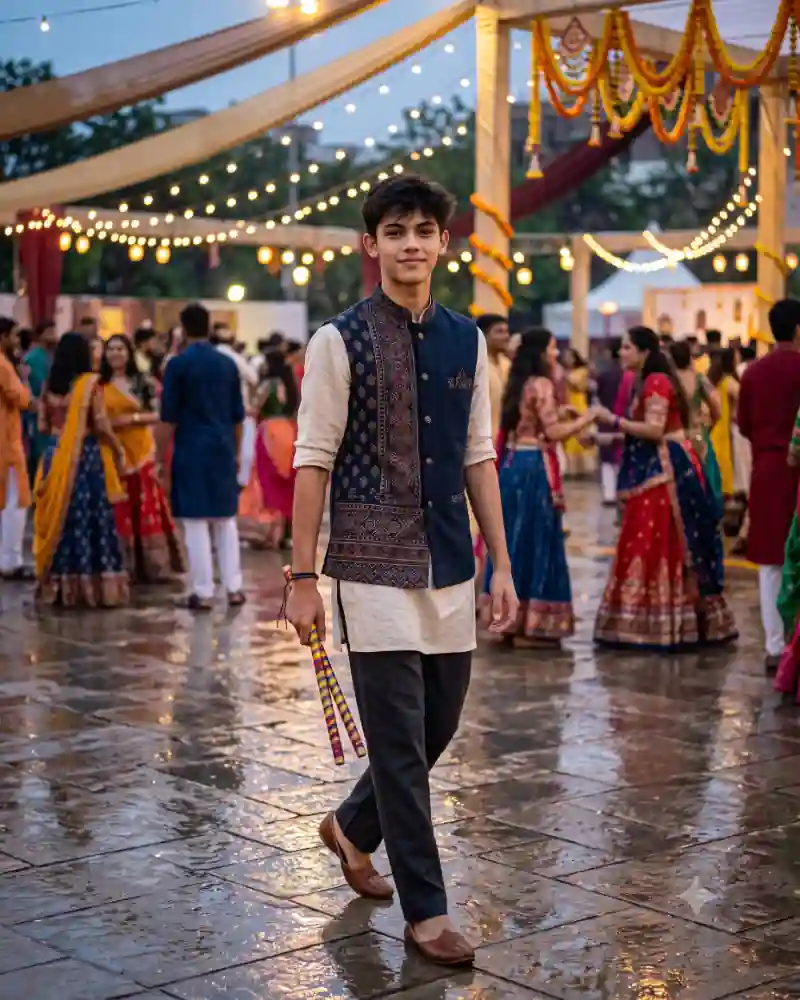
A little rain can change an entire festival photograph. In this Dandiya night portrait, the decorated lights are reflected across a wet stone courtyard. A boy in a patterned navy waistcoat walks through the venue with colorful sticks hanging at his side.
There is no complicated dance move here. The appeal is the contrast between his calm expression and the lively Garba crowd around him. The reflective ground adds another layer of light without needing extra effects.
Use the main AI photo prompt with a clear reference picture to try this look. It describes the outfit, the walking pose and the rain-washed setting so the editor has a more specific scene to work from.
Inside This Navy Waistcoat Dandiya Night Photo
The embroidered navy waistcoat is the most detailed part of the outfit. Its patterned panels stand out against an off-white kurta, while charcoal trousers and brown shoes give the look a slightly modern touch.
The decorated dandiya sticks are carried low in one hand, not raised in a dance pose. That small detail matters: the picture captures someone moving between dance rounds rather than performing for the camera.
The venue has warm strings of lights, marigold-wrapped posts and scattered groups of guests. Reflections ripple across the damp stone floor underfoot. There is no need to invent falling rain; the wet surface already tells the weather story.
Why This Particular Festival Look Works
Most Dandiya images focus on motion and bright costumes. This one works as a walking portrait, with a much quieter rhythm.
The contrast between amber bulbs and the cooler blue sky is another distinctive feature. Matching the light sources to the wet ground can make the image look more like an actual outdoor photograph than a heavily edited festival backdrop.
How to Create This AI Photo With Your Own Picture
Step 1: Choose a clear reference photograph
Use a well-lit picture with a clearly visible face. Avoid strong beauty filters that hide natural features. If someone else appears in the reference, make sure you have permission to use their photo. Ask for a venue after rain, not active rainfall, to keep the reflective courtyard believable.
Step 2: Open a compatible AI image editor
Try an editor that supports image generation or editing with uploaded photos, such as compatible versions of ChatGPT or Gemini. Tool features, availability and the way they interpret instructions can vary.
Step 3: Paste the main prompt from this page
Copy the full AI prompt from its separate prompt field. Keep the outfit, pose and setting instructions if you want to match the example, or edit only the details you want to change.
Step 4: Generate and inspect the first result
Check facial likeness, natural skin tones, hands, proportions, fabric edges, and the objects in the scene. A successful background cannot make up for an obviously incorrect hand or face. Check that the two dandiya sticks are both attached to the correct hand.
Step 5: Correct only what needs correcting
Instead of completely rewriting a prompt, request one focused adjustment at a time. Ask the tool to preserve the details that already work while fixing an awkward pose, clothing fold or background element.
Step 6: Export for where you will use it
Save the best quality available. A vertical 4:5 crop suits many photo posts, while 9:16 can work for Stories. Leave space around important details before choosing a tighter crop.
Pro Tips for a More Realistic Result
Keep the wet floor believable
Ask for a thin sheen of moisture on stone paving rather than a deep pool of water. Reflections should sit directly beneath nearby lights and people.
Use one clear hand grip
The colorful dandiya sticks should hang together naturally from one hand. If the model creates extra sticks, request exactly two with distinct ends.
Avoid adding falling rain
The image is set after rain, not necessarily during a downpour. Keep the sky clear enough for the warm festoon lights to show.
Preserve the embroidery
The waistcoat pattern should look stitched onto fabric, not printed across the whole kurta. Ask for readable folds and separate clothing layers.
Keep the walking step easy
A slightly crossed step and relaxed arm are enough. An exaggerated runway walk would feel out of place at a busy festival.
Balance warm and cool color
Keep the skin tones natural, the sky cool and the floor reflections warm. If everything turns orange, ask for a more neutral foreground.
Explore More AI Photo Editing Ideas
Looking for other festival scenes, portraits and editing styles? Browse the curated AI prompt library to see more sample images and find a prompt that matches the photograph you want to create.
If you are learning how to write better instructions or correct image details, the AI photo editing guides and tutorials cover practical ideas beyond this single picture.
Want to edit a photograph with two people rather than a solo portrait? Explore the couple photo prompt collection for shared poses, traditional clothing and different backgrounds.
Frequently Asked Questions
Can I make this Dandiya photo without a rainy background?
Yes. Replace the wet paving with a dry courtyard, but the reflections are one of the strongest details in this particular look.
Does the pose need to be a dance move?
No. The reference style is a relaxed walking portrait while carrying dandiya sticks. That makes it different from action-oriented Garba prompts.
Can I change the navy waistcoat to a kurta set?
Yes. You can request a more traditional matching kurta set, although you will lose some of the visual contrast between the embroidered jacket and plain shirt.
Why are the reflections sometimes wrong?
AI tools may place glowing shapes where no light source exists. Ask for reflections that correspond to the bulbs and pillars actually visible in the scene.
Can I use this AI photo prompt in Gemini or ChatGPT?
You can try it in a compatible version of Gemini or ChatGPT that supports image generation or editing with reference photographs. Upload your image, paste the main prompt, then review the result. Available features and output quality may differ.
How do I keep my face recognizable in the new image?
Use a clear reference photograph and ask the editor to preserve recognizable facial features, natural complexion and hairstyle. Review the generated picture against your original and request corrections when necessary. Exact facial preservation is not guaranteed.
Final Thoughts
The wet courtyard, patterned navy waistcoat and casually held dandiya sticks turn an everyday walking pose into a distinctive Navratri portrait.
Focus on believable reflections and hand positions before adding anything else. Those two details do more for this scene than extra effects.