Kolkata during Durga Puja has a look of its own. Old buildings, neighborhood pandals, drummers and groups of
people moving from one celebration to another all become part of the street.
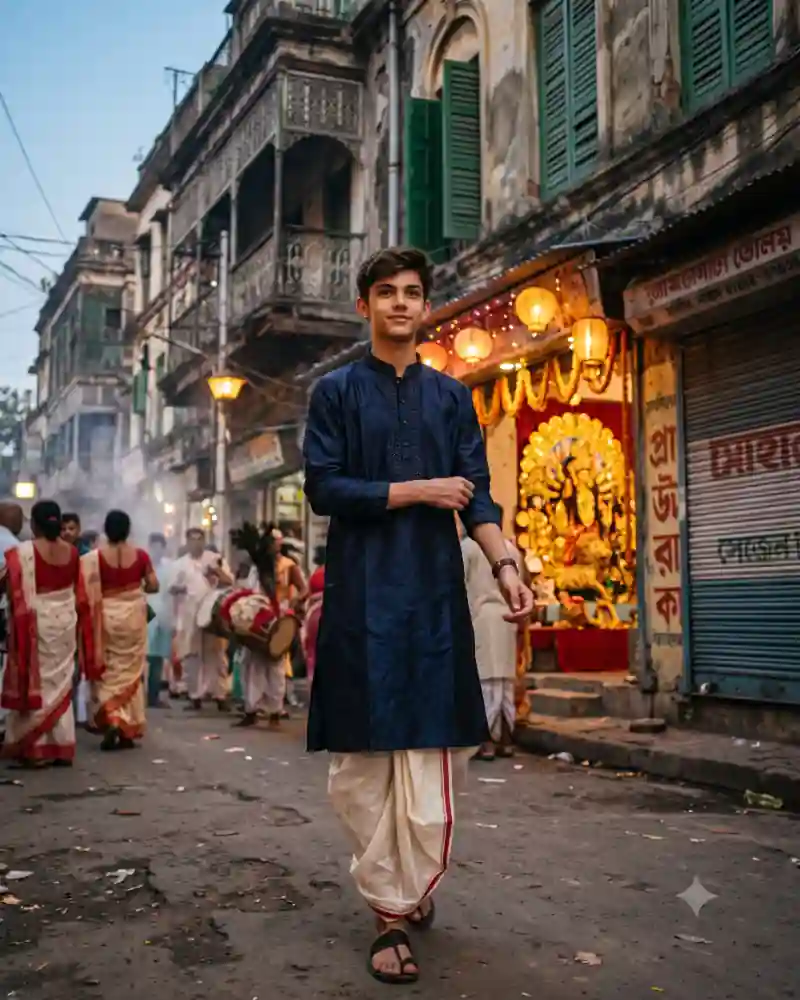
This portrait places a boy in a navy kurta and off-white dhoti in the middle of that scene. He is walking
casually toward the camera, with lanterns glowing at a pandal entrance behind him.
Rather than turning the entire street into a colorful stage, the picture keeps its everyday details. That is what
makes it useful as a realistic Durga Puja street AI photo prompt.
Inside This Kolkata Durga Puja Street Portrait Photo
The outfit is traditional and uncomplicated: a long navy kurta with subtle front embroidery, an off-white
Bengali-style dhoti with a narrow red border, and simple dark sandals.
The street itself matters just as much. Faded facades, balconies with green shutters, closed shops, overhead
wires and uneven paving establish the sense of an older city lane.
Farther back, a decorated Durga idol and warm lanterns mark the pandal. A few people in white-and-red sarees and
drummers with traditional drums add movement without becoming the subject of the photograph.
Why This Particular Festival Look Works
This is not a temple interior portrait or a studio backdrop with festival props. It is a street photograph with a
celebration happening nearby.
The navy and cream clothing stays calm against the warm pandal lights. Keeping the buildings imperfect and the
crowd slightly blurred helps the image feel lived-in rather than polished beyond recognition.
How to Create This AI Photo With Your Own Picture
Step 1: Choose a clear reference photograph
Use a well-lit picture with a clearly visible face. Avoid strong beauty filters that hide natural features. If
someone else appears in the reference, make sure you have permission to use their photo. Avoid adding real shop
names or famous landmarks that are not present in the example.
Step 2: Open a compatible AI image editor
Try an editor that supports image generation or editing with uploaded photos, such as compatible versions of
ChatGPT or Gemini. Tool features, availability and the way they interpret instructions can vary.
Step 3: Paste the main prompt from this page
Copy the full AI prompt from its separate prompt field. Keep the outfit, pose and setting instructions if you
want to match the example, or edit only the details you want to change.
Step 4: Generate and inspect the first result
Check facial likeness, natural skin tones, hands, proportions, fabric edges, and the objects in the scene. A
successful background cannot make up for an obviously incorrect hand or face. If the dhoti folds look wrong, revise
the lower half without changing the face or street.
Step 5: Correct only what needs correcting
Instead of completely rewriting a prompt, request one focused adjustment at a time. Ask the tool to preserve the
details that already work while fixing an awkward pose, clothing fold or background element.
Step 6: Export for where you will use it
Save the best quality available. A vertical 4:5 crop suits many photo posts, while 9:16 can work for Stories.
Leave space around important details before choosing a tighter crop.
Pro Tips for a More Realistic Result
Keep the Kolkata lane believable
Use weathered buildings, shutters and balconies, but do not fill the scene with random oversized landmarks. The
narrow street is enough to establish the location.
Show the dhoti clearly
The off-white wrap should have consistent folds and a thin red edge. Check that it does not turn into western
trousers or attach awkwardly to the sandals.
Treat the pandal as background
Let the illuminated Durga idol appear at a believable distance. A giant face floating above the subject would
break the documentary feel.
Avoid fake readable shop signs
AI-generated writing can be distorted. Ask for indistinct distant shop lettering or keep signage out of focus
instead of inventing real business names.
Use an easy walking step
A modest step and relaxed upper body feel more natural than an exaggerated fashion pose on a busy street.
Keep the atmosphere balanced
A little haze and warm light are useful, but the entire street should not be covered in thick smoke. Keep
foreground textures visible.
Explore More AI Photo Editing Ideas
Looking for other festival scenes, portraits and editing styles? Browse the curated AI prompt library to see more sample images and find a prompt that
matches the photograph you want to create.
If you are learning how to write better instructions or correct image details, the AI photo editing guides and tutorials cover practical ideas beyond this
single picture.
Want to edit a photograph with two people rather than a solo portrait? Explore the couple photo prompt collection for shared poses, traditional
clothing and different backgrounds.
Frequently Asked Questions
Can I use this prompt for a Durga Puja pandal-hopping photo?
Yes. That is close to the intended scene: a portrait on a neighborhood street with a festive pandal visible
nearby.
Can I change the navy kurta to a white panjabi?
Yes. A white or cream traditional top also suits a Bengali festive street portrait, though the navy version
provides stronger contrast with the surroundings.
Why should I avoid readable signs in the generated photo?
AI image tools can produce inaccurate or nonsensical lettering. Keeping background signs soft makes the picture
more natural and avoids making up businesses.
Is this a real photo of a named Kolkata location?
No specific landmark is being claimed here. The prompt recreates the atmosphere of a Kolkata-style street during
Durga Puja, rather than documenting a particular address.
Can I use this AI photo prompt in Gemini or ChatGPT?
You can try it in a compatible version of Gemini or ChatGPT that supports image generation or editing with
reference photographs. Upload your image, paste the main prompt, then review the result. Available features and
output quality may differ.
How do I keep my face recognizable in the new image?
Use a clear reference photograph and ask the editor to preserve recognizable facial features, natural complexion
and hairstyle. Review the generated picture against your original and request corrections when necessary. Exact
facial preservation is not guaranteed.
Final Thoughts
The appeal of this Durga Puja portrait is in the small city details: an old street, a quiet walking pose and
festival lights just behind the subject.
Use a clear face reference, keep the traditional clothing accurate and resist the temptation to turn the
background into an overdecorated set.