
Top Trending AI Photo Editing Prompts 2026 | Copy & Paste

Top Trending AI Photo Editing Prompts 2026 are easier to choose when you can see a sample image before copying anything. A good example tells you what the final picture might look like, whether it’s a cinematic portrait, a festive couple photo, a vintage film look, or a simple change of background.
That’s the idea behind this PromptCine collection. You can browse photo ideas, find a style that catches your eye, and open its prompt page to see the instructions. No need to guess what a long block of text is supposed to create.
New ideas can be added as the collection grows, so the gallery may look different on your next visit. If you’re looking for the latest AI photo editing prompts, start with the images below and pick a look that suits your own picture.
Browse Trending AI Photo Editing Prompts for 2026
Have a look through the gallery before choosing a prompt. Pay attention to the clothing, background, pose, and lighting in each example. A style that looks great as a full-length portrait may not work as well with a tightly cropped selfie.
When you find something you like, open its detail page to read the full instructions and use the Copy Prompt button. You can follow the original idea or change a few details to make the result more personal.
Explore prompts
All prompts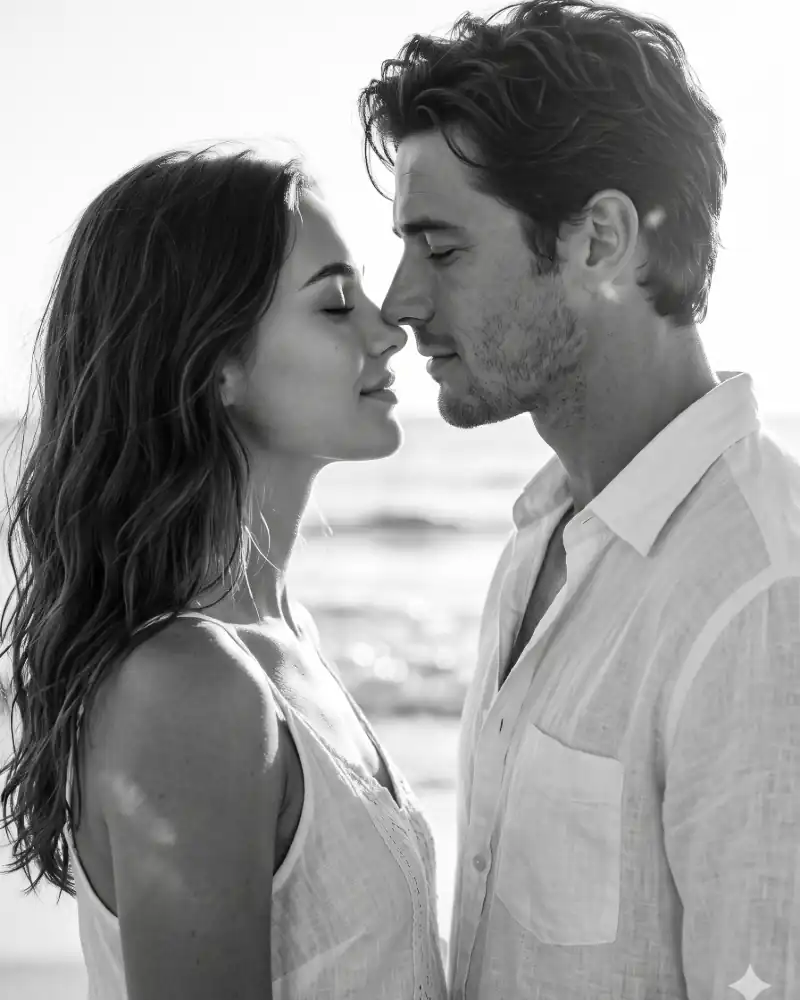 PhotoCouple
AI Couple Portrait Prompt – Cinematic Romantic Black & White Photo
Nano Banana · Gemini
Use my uploaded photo as the ONLY reference for both people. Create a new cinematic close-up of the same two people standing nose-to-nose, about to kiss, faces very close, eyes closed, soft smile, on a beach in strong backlight. Face rules: keep both faces 100% identical to my uploaded photo - same face shape, eyes, eyebrows, nose, lips, jawline, hairstyle, beard or stubble, skin tone and skin texture. Do not beautify, smooth, slim, age or change the faces. Do not blend or swap the two faces. Style: black-and-white, high contrast, blown-out white sky, blurred ocean background, soft rim light on hair, shallow depth of field, 85mm lens, fine film grain, romantic mood, light summer outfits, ultra-realistic, 3:4 vertical portrait.
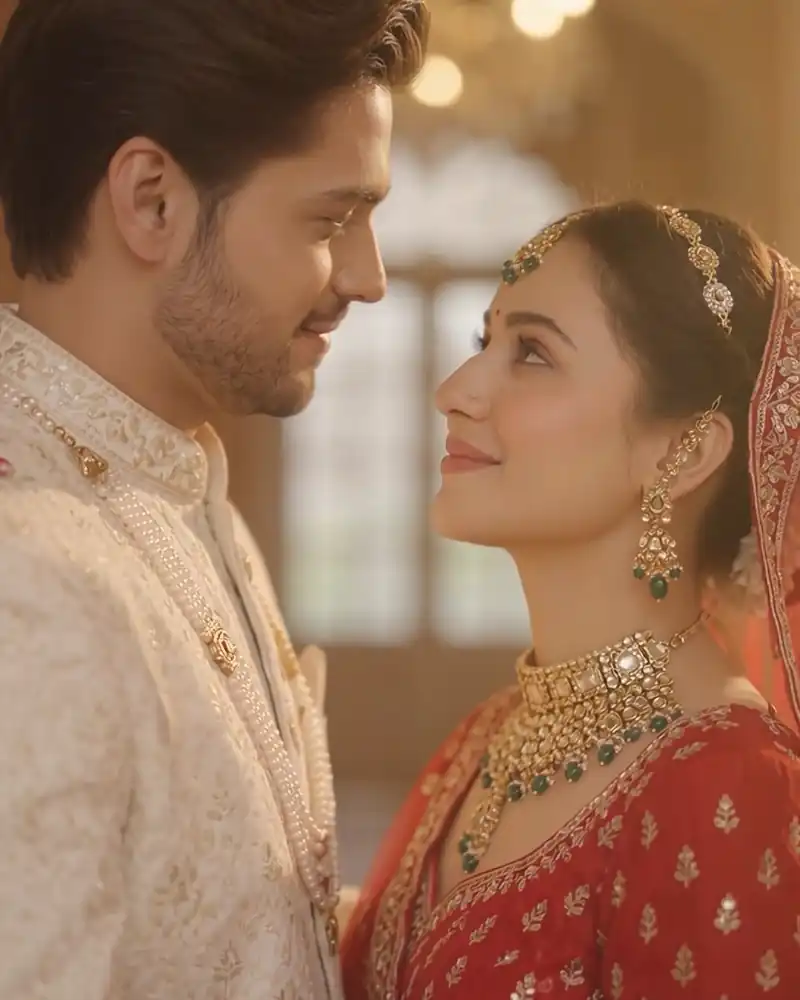
Best Wedding AI Video Prompts For Bride And Groom
Omni · Google Flow
Cinematic Indian pre-wedding film shot, 8 seconds, shot on ARRI Alexa Mini with a 35mm anamorphic lens, shallow depth of field, warm golden-hour color grade, soft film grain. SUBJECTS: A young Indian couple. The groom wears an ivory sherwani with subtle gold embroidery. The bride wears a deep red lehenga with a sheer dupatta, delicate gold jewellery and natural makeup. LOCATION: Courtyard of a grand Rajasthani heritage palace at golden hour, sandstone arches, marigold garlands, glowing diyas, soft haze, floating rose petals. SHOT SEQUENCE:[0-3s] Slow dolly-in from a wide establishing shot. The bride stands with her back to camera at the end of an arched corridor, her dupatta fluttering in the breeze. The groom steps into frame behind her.[3-6s] Camera glides into a medium shot. She turns slowly, their eyes meet, and both smile shyly. He gently tucks a loose strand of hair behind her ear. Warm sun flare, backlit petals drifting through the air.[6-8s] Camera arcs smoothly around them as they bring their foreheads together. Close focus on their joined hands, mehndi and a gold ring glinting in the sunlight. AUDIO: Soft romantic Indian instrumental with flute, sitar and light tabla, gentle wind, faint temple bells. No dialogue. STYLE: Dreamy, luxurious, romantic, natural skin tones, smooth gimbal movement, soft bloom on highlights. AVOID: text, subtitles, watermark, distorted faces, extra fingers, flickering, jump cuts
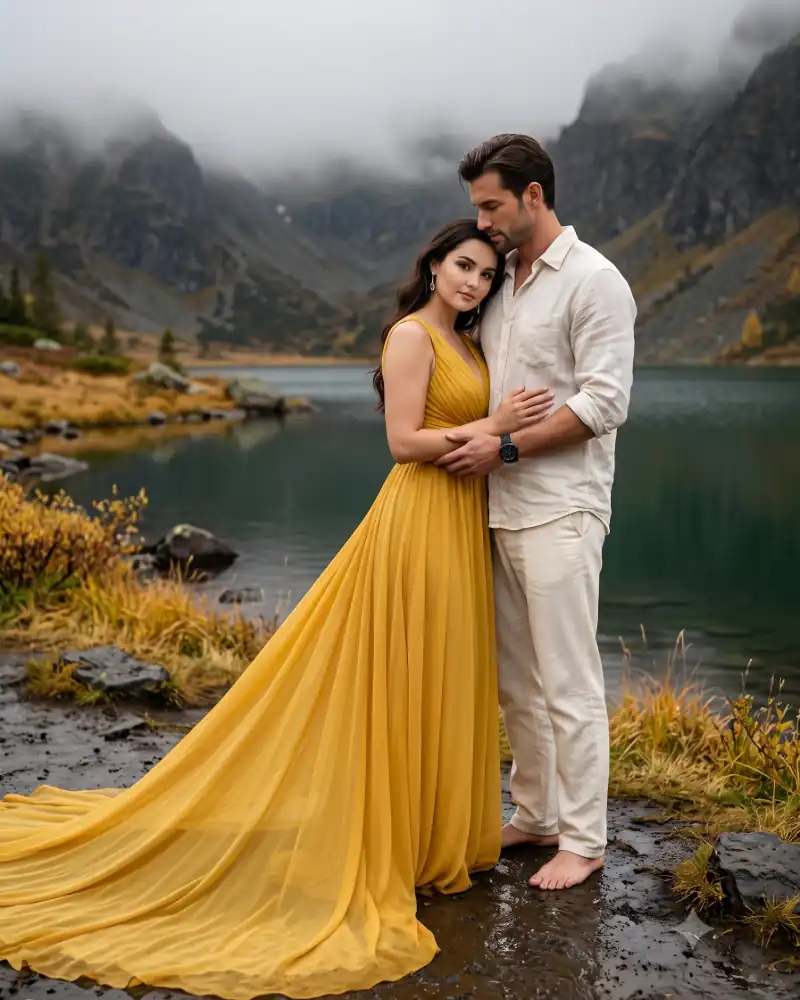
Romantic Couple AI Prompts Realistic Gemini Photo Looks
Nano Banana · Gemini
Ultra-realistic cinematic romantic couple portrait, misty mountain lakeside. Keep exact faces from the uploaded reference photo(s), real skin pores. Vertical 3:4, full-length, couple slightly right of center, extremely long gown train sweeping across the foreground. Woman (~27): slender hourglass. Man (~31): tall, athletic, slightly taller than her. Tender shoreline embrace: she leans on his chest in near-profile, head turned to camera, chin lowered, calm direct eye contact. He holds her waist, gazing down at her, not the camera. She: sleeveless mustard-yellow chiffon gown, ruched V-neck, extra-long semi-sheer train, silver drop earrings. He: off-white crinkled linen shirt, rolled sleeves, cream trousers, dark sports watch, barefoot. Wet black basalt shore, still green lake, golden grass, rugged mountain fading into thick fog. 85mm f/1.4, soft overcast light, creamy bokeh, vivid natural color, 8K. Only text: "Promptcine" signature watermark, bottom-left, Petit Formal Script, soft white. Avoid: plastic skin, CGI, deformed face, bad hands, kissing, closed eyes, blue sky.
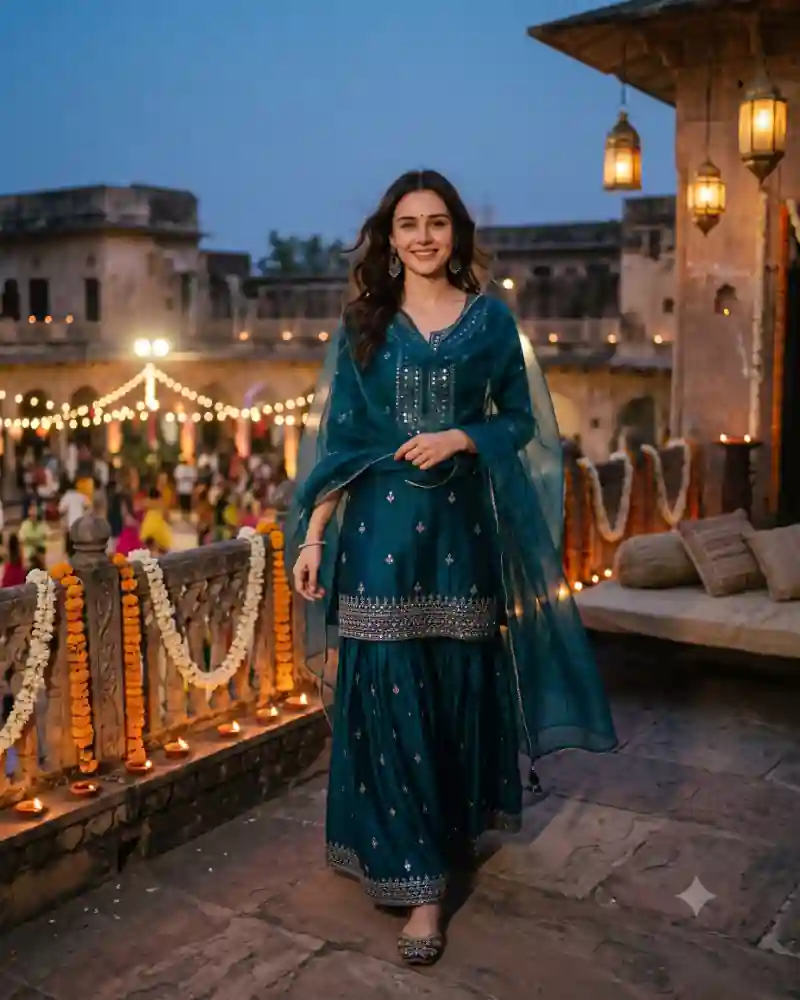
Teal Sharara Navratri Balcony AI Photo Prompt for Girls
Nano Banana 2 · Gemini
Produce a spectacular, highly realistic luxury Navratri fashion portrait using the uploaded female photograph as the exact facial identity reference. FACE LOCK — IMPORTANT: Preserve the woman's original face precisely, including bone structure, eyes, nose, lips, natural complexion, hairline and age. The result must clearly show the same real person, without artificial facial enhancement or identity drift. Dress her in an exceptionally elegant contemporary Indo-fusion festive ensemble: a midnight-teal silk sharara set featuring delicate handcrafted antique-silver mirror embroidery, a beautifully tailored modest embroidered kurti, wide flowing sharara trousers and a lightweight sheer teal organza dupatta with tiny hand-finished borders. Accessorize with refined oxidized-silver statement earrings, a delicate bracelet and traditional embroidered juttis. Style her hair in soft natural waves, with realistic individual strands catching the evening light. The scene takes place on the beautifully decorated terrace of a historic Indian haveli during an intimate Navratri celebration. Real marigold garlands, terracotta oil lamps, handwoven cushions and warm hanging lanterns create an inviting, authentic festive setting. Capture the subject walking slowly across the terrace while lightly adjusting her dupatta, glancing naturally toward the photographer. Her expression is relaxed and spontaneous. A softly illuminated Garba gathering appears in the distant courtyard. The sky retains a beautiful natural blue-hour tone. Warm practical lantern light falls realistically across the subject, giving the photograph a refined editorial atmosphere without fake studio spotlighting. Photographed on a professional full-frame 85mm lens, f/2, natural low-light exposure, delicate photographic grain, realistic cloth movement, detailed embroidery, authentic skin texture and balanced cinematic color grading. No CGI appearance, unnatural moon glow, artificial facial symmetry, exaggerated jewelry, plastic skin, unrealistic architecture, duplicated limbs or excessive post-processing. Vertical portrait aspect ratio 4:5, premium cinematic fashion photography, high-resolution detail, no captions or watermark.
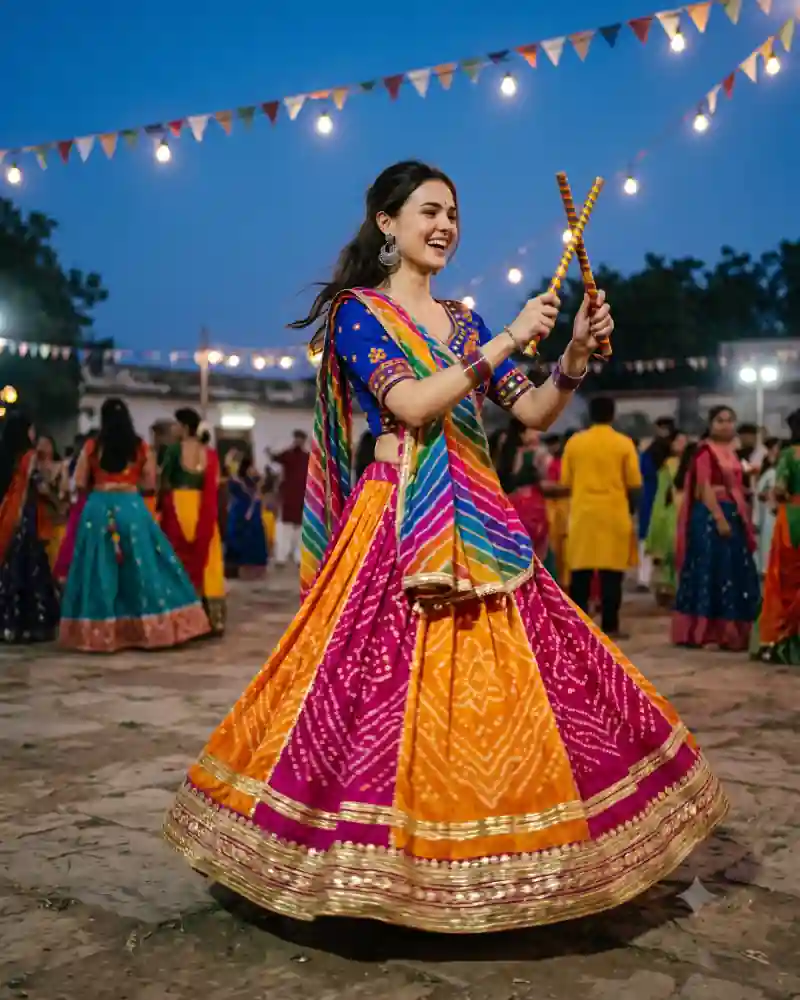
Bandhani Dandiya Night AI Photo Prompt for Girls
Nano Banana 2 · Gemini
Generate an extraordinary cinematic Navratri Dandiya photograph that looks like a genuine premium analog-film fashion editorial, using the uploaded female reference photo. FACE IDENTITY MATCH: Maintain the woman's exact natural facial identity, facial proportions, original skin tone, eyes, nose, lips and age. Preserve her recognizable features without beautifying or replacing them. Style her in a distinctive Rajasthani-Gujarati fusion lehenga featuring rich fuchsia and saffron Bandhani tie-dye panels, naturally woven textile patterns, delicate antique-gold gota detailing and a flowing lightweight skirt. Combine this with an elegant royal-cobalt embroidered choli, a contrasting multicolored leheriya dupatta and handcrafted oxidized-silver chandbali earrings. Her hair is styled in a relaxed half-up hairstyle, with a few natural flyaway strands. Jewelry and makeup are festive but restrained. Capture a spontaneous moment at an outdoor Dandiya celebration just after sunset. She holds two beautifully painted wooden Dandiya sticks and is laughing naturally while participating in a dance sequence. Her face remains crisp while movement is suggested by fabric and softly blurred activity behind her. The environment features charming strings of old-fashioned festival lightbulbs, embroidered decorations, real festival attendees and textured stone flooring. The sky is deep twilight blue, beautifully contrasting with warm amber festive lighting. Shoot using a full-frame 35mm lens, f/2, 1/320s, refined warm-cool color separation, natural film grain, slightly softened highlight roll-off, realistic shadows and detailed fabric texture. Avoid fantasy lighting, overly polished AI faces, excessive bokeh, duplicate people, unnatural limb positions, stiff poses and impossible flowing fabric. Vertical 4:5 photographic composition, unique artistic framing, no watermark or typography.
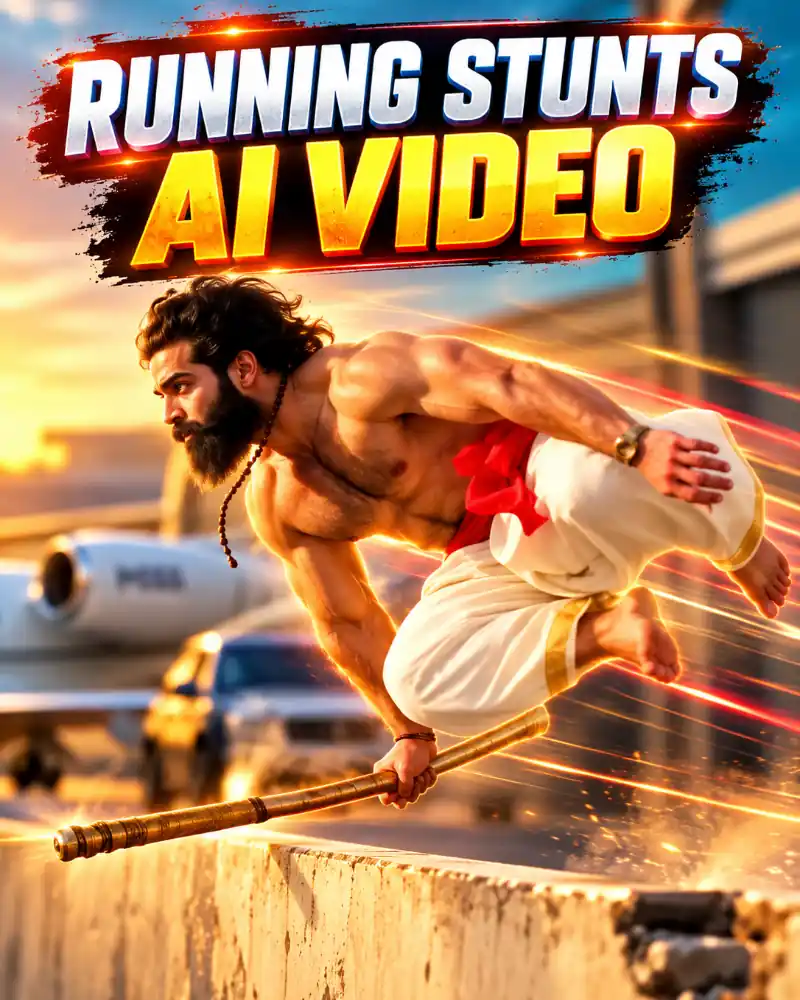
Instagram Trending Running Stunts AI Video Prompt Funny
Omni · Google Flow
Replace The Man With This Reference Image Don't Change The Scene
What Types of AI Photo Editing Prompts Are Worth Trying?
There’s no single editing style that works for every photo. Some people want a natural portrait they can use as a profile picture. Others prefer a more noticeable change, such as a traditional outfit, a film-inspired scene, or a different location.
Here are a few styles worth exploring as you browse the collection.
Realistic AI Portrait Photo Editing Prompts
If you want a picture that still feels like an ordinary photograph, start with realistic portrait prompts. These usually focus on natural lighting, clear facial details, believable clothing, and a background that doesn’t distract from the subject.
Try looking for soft daylight, an outdoor portrait setting, or a simple studio backdrop. You don’t need dramatic effects to make an interesting picture.
Pay particular attention to the expression. A relaxed face and comfortable pose often make the final image more convincing than adding extra effects.
Cinematic AI Photo Editing Prompts
Cinematic photo edits borrow ideas from movie photography. You might see dramatic evening lighting, a rainy street with reflections, a softly lit room, or a wide scene with the subject standing away from the camera.
The mood matters more than the number of effects. A clear subject, one interesting location, and consistent lighting are usually enough to give a picture a film-inspired feel.
If an edit looks too artificial, try reducing the contrast, removing unnecessary light effects, or asking for more natural colors.
Couple AI Photo Editing Prompts
Couple prompts are a good option when you want to create a shared portrait from two reference pictures. The result can be a simple candid photograph, a traditional celebration, or a carefully arranged portrait.
Choose the pose before worrying about the decorations. Holding hands, standing side by side, or sharing a relaxed moment are different compositions, and each works with a different camera angle.
For example, our Forehead-to-Forehead Garba Couple Pose focuses on a close-up portrait with soft festival lights. It’s quite different from a full-length dance photograph.
Traditional Outfit and Festival AI Photo Prompts
Traditional outfits and festive settings offer plenty of room for creative photo editing. Embroidered clothing, decorative lights, flowers, and recognizable celebration details can help establish the setting without needing complicated backgrounds.
The trick is to be specific. Rather than asking for a generic festival picture, choose one occasion, one outfit combination, and one clear pose.
Our Romantic Garba Couple AI Photo Prompt is an example of a golden-light dandiya scene, while the Diya-Lit Courtyard Couple Dance Prompt uses a traditional courtyard and flowing festive clothing.
These small differences are worth noticing when you’re deciding which prompt to try.
Retro and Vintage AI Photo Editing Prompts
Sometimes a slightly imperfect photograph is more interesting than a perfectly polished one. Retro-inspired edits can use soft focus, subtle grain, faded colors, or lighting that resembles an older film camera.
You could try an old-fashioned studio portrait, a film-era street scene, or a casual picture with nostalgic colors.
Keep the details consistent with the look you’re creating. Combining too many different decades, camera effects, and clothing styles can make the finished picture feel confused rather than nostalgic.
AI Photo Prompts for Instagram and Profile Pictures
For a profile picture, the most useful prompt isn’t always the most elaborate one. A clear face, simple background, and natural framing often work better at a small display size.
Instagram posts give you more room to experiment with a full outfit, a couple portrait, or a scenic background.
Before choosing a prompt, think about where you’ll use the finished image. A vertical portrait might look great in the feed, while a centered square crop may work better for a profile picture.
How to Use AI Photo Editing Prompts With Your Own Photos
You don’t need to write complicated instructions from scratch. Start with one of the prompt examples in the gallery and use an image editor that supports the type of edit you want.
Tools such as Google Gemini and ChatGPT offer image-generation or editing features in supported versions. The exact options, limits, and results can vary.
Step 1: Find a Photo Style You Like
Browse the example images and decide what you want to change. It might be the background, outfit, lighting, camera angle, or the entire scene.
Try to choose a prompt with a clear visual direction. When a picture contains too many unrelated effects, it’s harder to know which details matter.
Step 2: Choose a Clear Reference Photo
Select a photograph where your face is easy to recognize. Natural lighting and a clear view of the subject are helpful.
For couple or group portraits, use photos that you have permission to edit. If you’re uploading separate pictures, identify the people clearly in your instructions.
Step 3: Open the Prompt and Copy the Instructions
Choose a gallery card to open its individual page on PromptCine. Read the scene description, then use the Copy Prompt button.
You can paste the instructions into a compatible AI image editor. If the prompt includes an outfit, location, or pose you don’t want, change that detail before generating.
Step 4: Generate Your First Version
Upload the reference photo if your editor supports it, paste the prompt, and generate the image.
Take a moment to check the result before saving. Look at the facial features, hands, clothing, background, and any objects the person is holding.
AI image editors can sometimes change details you wanted to keep, so the first result may not be the final one.
Step 5: Make Small Changes Instead of Starting Over
If most of the picture looks right, ask for one specific correction.
For example, you could keep the same clothing and pose while requesting softer lighting or a less crowded background.
If the editor has changed the person’s appearance too much, try uploading the original reference again and asking it to preserve recognizable facial details.
Step 6: Save the Image for Its Intended Use
Once you’re happy with the result, save it using the best available quality settings.
A 4:5 portrait is useful for many feed-style photo posts. A 9:16 image can work for a Story or phone wallpaper, while a square format is often convenient for profile pictures.
Leave enough room around the subject so the final crop doesn’t cut off important details.
How to Choose a Better AI Photo Editing Prompt
Two prompts can describe almost the same idea and still produce very different pictures. The difference often comes down to how clearly they explain the scene.
Before copying a prompt, look for these details:
- Subject: Who or what should appear in the image?
- Pose: What is the person doing, and how should they face the camera?
- Setting: Where is the picture taking place?
- Lighting: Is it soft daylight, golden hour, studio light, or an evening scene?
- Clothing and details: Which colors, fabrics, or accessories matter?
- What stays unchanged: Which recognizable features or existing objects should the editor preserve?
You don’t need to mention every camera setting in every prompt. Clear everyday language can work well, especially when the request explains exactly what should change and what should remain the same.
Pro Tips for More Natural AI Photo Edits
Don’t Rely on “Ultra-Realistic” Alone
Adding the words “ultra-realistic” doesn’t automatically make an image convincing.
It helps to describe natural light, believable shadows, realistic fabric, and a comfortable pose. These details give the editor more useful direction than repeating the same quality words several times.
Keep Faces Recognizable
When using reference photos, ask the editor to preserve the person’s recognizable facial features, hairstyle, and natural complexion.
That doesn’t guarantee an exact match. Compare the result with the original photo, especially after changing the camera angle or adding another person to the scene.
Watch the Hands and Small Objects
Hands, jewelry, glasses, and objects held close to the face deserve a second look.
If something appears distorted, ask for a simpler hand position or a specific correction. You don’t always need to change the entire image.
Use Lighting That Matches the Scene
Good lighting should make sense for the location.
A sunset portrait needs a different feel from a studio headshot or a night-time festival photograph. If the subject looks brighter than everything around them, the scene may feel unnatural.
Try asking for consistent shadows and light that falls naturally across the people and background.
Don’t Overload a Prompt With Effects
More effects don’t necessarily make a better picture.
Pick one clear idea first. If you’re creating a vintage portrait, start with the period, clothing, and film texture. If you’re making a festival photograph, focus on the outfits, decorations, and expressions.
You can always experiment with additional details after getting a good first result.
Check the Final Crop
An image may look fine at full size but lose important details when cropped for a profile picture or social post.
Before saving, check that faces, hands, outfits, and other important elements remain visible in your chosen aspect ratio.
Explore More Couple and Festival Photo Ideas on PromptCine
If you’re browsing for festive couple portraits, you can also explore the Back-to-Back Garba Couple Pose. It uses colorful Gujarati outfits and dandiya sticks for a different kind of festival photograph.
For a candid celebration picture, the Romantic Dandiya Night Couple AI Photo Prompt focuses on bright yellow clothing and a cheerful moment under warm lights.
Each example has its own scene and instructions. Look through the pictures before choosing one, and feel free to adapt the smaller details to suit your photos.
Frequently Asked Questions
What are the top trending AI photo editing prompts in 2026?
They’re photo-editing instructions for popular or emerging visual styles, such as realistic portraits, cinematic scenes, retro-inspired pictures, couple edits, and festive photography. Trends change throughout the year, so the most useful choice is often the one that matches the image you want to create.
How do I find the latest AI photo editing prompts?
Start with the gallery on this page and look at the newest available prompt examples. Open an individual prompt to view its image, description, and copy-ready instructions. New additions will appear as they’re published to the collection.
Can I use these prompts with Google Gemini?
Many descriptive photo prompts can be tried in Gemini versions that support image generation or editing. Upload your reference image if supported, paste the instructions, and review the result. Some prompts may need adjustments depending on the tool.
Can I use the same AI photo prompt in ChatGPT?
You can try compatible photo-editing instructions with ChatGPT’s image features. Different editors may interpret the same prompt differently, so compare the output and adjust the wording when necessary.
Do I need professional photo editing skills?
No. A clear reference photo and well-written instructions are enough to get started with many AI image editors. It still helps to understand basic choices such as framing, lighting, and background, especially when you want to refine the result.
Can AI photo editing prompts keep my face exactly the same?
Not always. Reference images help an editor maintain recognizable details, but results can vary. If the generated face looks different, try a clearer reference photo and ask the editor to preserve the original facial features more closely.
Are these AI photo editing prompts free to use?
You can browse the available prompt examples and copy instructions from PromptCine. Whether image generation itself is free depends on the AI service you choose, its available features, and any usage limits.
Are new AI photo prompts added to this collection?
This collection is intended to grow as new photo ideas are published. The gallery reflects the prompts currently available, so you can return later to see whether new styles have been added.
Which AI photo prompt should I choose for Instagram?
For a profile picture, choose a style with a clearly visible face and a simple background. For a feed post, you can experiment with a cinematic portrait, traditional outfit, or couple scene. Pick the aspect ratio based on where you plan to share the final image.
Find Your Next AI Photo Idea
It’s easy to spend more time searching for a prompt than actually making the picture. Seeing the example first makes that choice simpler.
Browse the gallery, choose a look you genuinely like, and start with its original instructions. Change the details that matter to you, check the result carefully, and don’t worry if it takes more than one attempt.
We’ll keep building this collection as new prompt ideas become available on PromptCine. You can return to explore the latest additions without having to start your search from scratch.