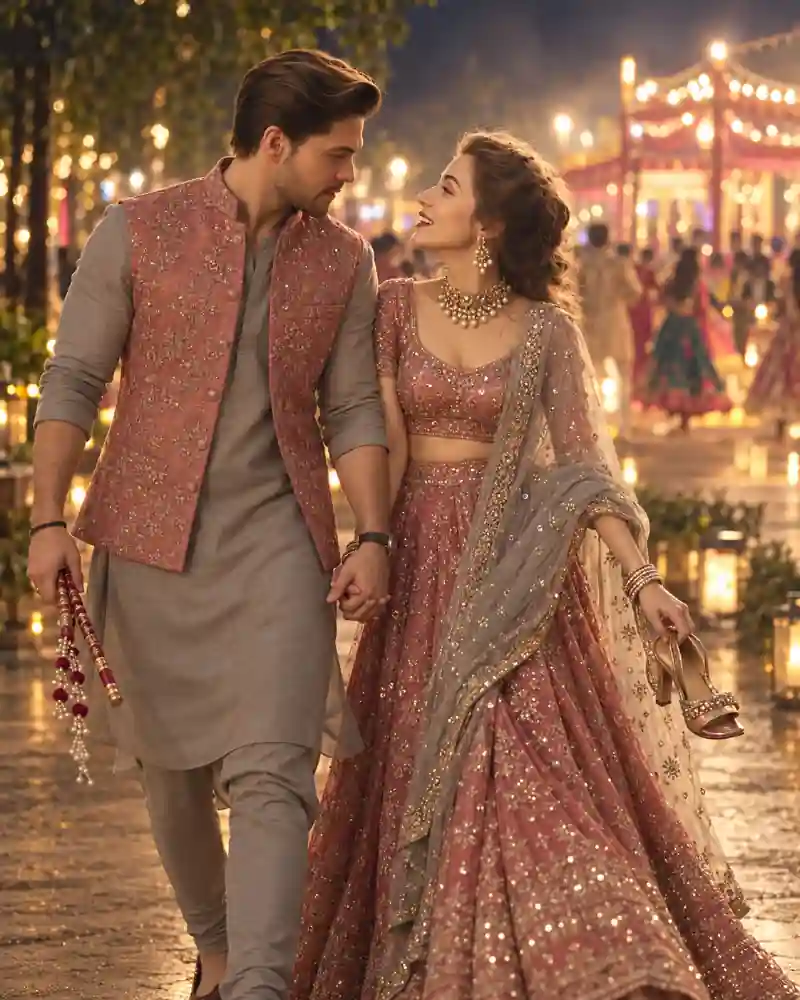
A Garba night couple walking AI photo prompt captures the moments after the dancing, when the music is still playing somewhere behind you but it's time for a slower walk. In this scene, the couple moves hand in hand along a glowing festival path. He carries dandiya sticks, while she holds a pair of heels in her free hand. That little detail makes the picture feel lived-in. It looks less like a planned photoshoot and more like a candid memory from the end of a busy Navratri evening. Use the main prompt above with your own reference photos to try the same natural walk, muted festive clothing, and warm background lights.
A Quiet Walk After the Garba Celebration
The man wears a light grey kurta and trousers with a dusty-rose embroidered jacket. His free hand holds a small set of decorated dandiya sticks, and he turns toward his partner with a relaxed smile. The woman wears an intricately detailed rose-pink lehenga with a cool grey-blue sheer dupatta. She has traditional earrings and softly styled hair. In her free hand, she carries a pair of heels by their straps. Neither person is posing directly for the camera. Their joined hands sit naturally between them, and their body positions suggest a leisurely walk rather than a dance step. Warm bulbs, distant Garba guests, and a decorated path recede into a gentle blur. The lights reflect subtly off the ground, adding atmosphere without making the scene look rainy or artificially glossy.
The Small Props That Tell the Story
What separates this photo from another festival couple portrait is the combination of a hand-in-hand walk and two ordinary objects. The dandiya sticks quietly establish where the couple has been. The shoes suggest a more personal, end-of-evening moment. Neither prop should take over the frame, but both help make the image specific. If you'd rather try a formal standing pose or a lively dance picture, browse the couple AI photo prompt collection and compare different scenes.
How to Create This Garba Night Walking Photo
Step 1: Start With Clear Reference Photographs
Choose an image where both faces can be recognized, or separate portraits if your editor supports more than one reference. Natural source lighting helps you compare facial features later. Always obtain permission to use the photos.
Step 2: Upload and Assign the Outfits
Explain that the man wears the grey kurta and rose jacket and the woman wears the dusty-rose lehenga with a grey-blue dupatta. Tell the editor to keep each person recognizable.
Step 3: Copy the Main AI Prompt
Paste the prompt from this page into a compatible editor. It describes the easy walking pose, linked hands, dandiya sticks, carried heels, and warm festival pathway.
Step 4: Check Hands, Shoes, and Walking Posture
Review the joined hands and make sure the free hands hold the objects correctly. The legs should appear to be taking a natural step, and the carried heels should look like two real shoes.
Step 5: Adjust the Background Carefully
If the path looks crowded or overlit, ask for softer distant guests and smaller light reflections. Keep the couple, outfits, and small props unchanged if those details already look good.
Pro Tips for a Believable Festival Stroll
Keep the Walking Motion Relaxed
One natural step is enough. Long exaggerated strides can distort clothes and legs, while frozen standing positions remove the casual feeling of the picture.
Use Only the Props You Need
A few dandiya sticks and one pair of carried heels tell the story. Extra bags, phones, and decorations can distract from the linked hands.
Check Both Free Hands Separately
One hand holds the sticks; another holds the shoes. If these objects overlap or float, ask for separate natural grips with visible fingers and believable proportions.
Keep the Rose and Grey Outfits True to Color
Golden light can push pink clothes toward orange. If that happens, request faithful dusty-rose fabric and a cool grey-blue dupatta while preserving the warmth of the venue.
Don't Lose the Pathway
Some ground should be visible to support the walking pose. A full or three-quarter-length frame helps show the legs, footwear, and direction of movement. For more advice on complex hand positions and realistic AI edits, browse the PromptCine AI photo editing guides.
Frequently Asked Questions
Can I create this walking couple image with Gemini AI?
Yes, in a supported image editor that accepts reference photos. The hand-held objects and leg positions are the details most worth checking afterward.
Does the prompt work with ChatGPT image editing?
You can try the scene in compatible ChatGPT image features. Results will vary, and a second edit may be needed to correct the dandiya sticks or shoes.
Do we need a real walking photo?
No. A compatible AI editor can attempt to generate the walking pose from ordinary portraits. A reference image with both faces clearly visible remains helpful.
Why is the woman carrying heels in this scene?
It's a small storytelling detail that makes the portrait feel like an easy walk after the celebration. You can remove it from the prompt if you prefer both people to be fully dressed for the dance floor. PromptCine | Pages 7-13 SEO copy package Page 29
Can I change the dusty-rose colors?
Yes. You could choose peach, sage green, navy, or another coordinated combination. Keep the calm walking pose and warm Garba lights to preserve the scene's mood.
Is a full-length image better than a close-up?
For this specific concept, usually yes. A full or three-quarter frame helps show the walking step, dandiya sticks, and shoes. A close-up could hide the details that make the picture distinctive.
Final Thoughts
Some of the nicest festival pictures are taken away from the dance floor. This one tells its story through linked hands, a gentle smile, and the small things the couple carries home. Explore the PromptCine curated AI prompt library for more visual ideas and choose the kind of scene that matches your own celebration.